Mobile payment
Pay with Venmo
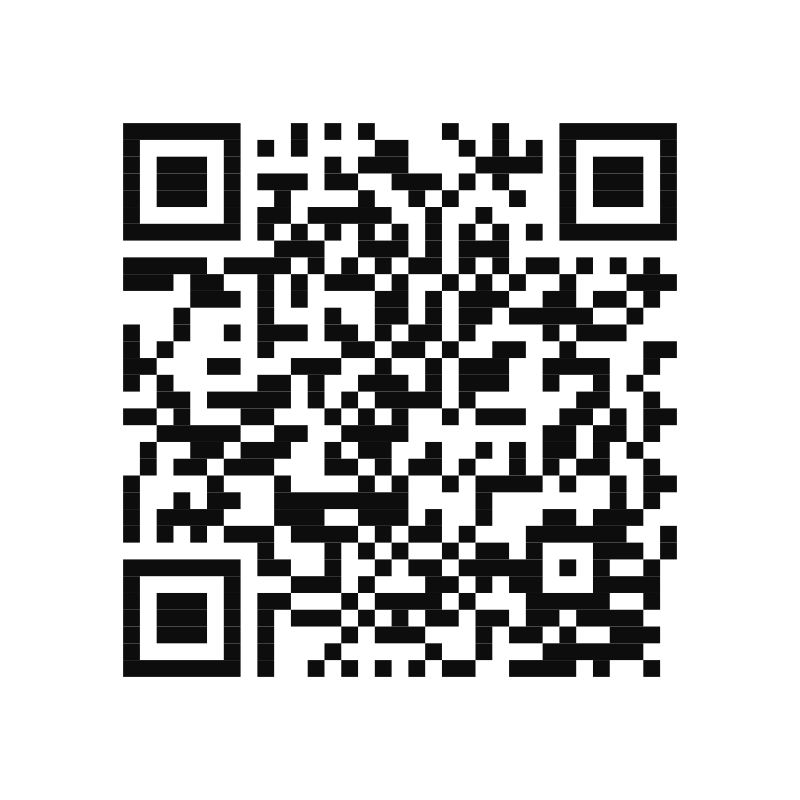
Scan the QR code with your phone camera or open the official Venmo payment link. Confirm the recipient and exact amount before sending.
Open Venmo SecurelyOfficial payment options

Use the payment method confirmed with our team, verify the recipient details, and enter only the amount you have already approved.
Simple • direct • confirmed
Only submit a payment after 3 Angel’s Home Services LLC has confirmed your service and amount. Always review the recipient information inside Venmo or PayPal before completing the transaction.
Mobile payment
Scan the QR code with your phone camera or open the official Venmo payment link. Confirm the recipient and exact amount before sending.
Open Venmo SecurelyOnline payment
Recipient shown on QRSherley Pierre-Louis
Open the PayPal app and scan this official QR code. Verify the displayed recipient and exact amount before completing payment.
Open QR Full SizeBefore you send
These simple checks help make sure your payment reaches the correct recipient and is easy to match with your service request.
Pay only the service amount confirmed directly by the team.
Use the official link or QR code shown on this page.
Review the name and account details shown inside the payment app.
Save the transaction confirmation for your records.
Need assistance?
Call or contact us before submitting payment if the amount, recipient, or service details do not match what you were given.